The way I run client Google Ads accounts now, an AI agent does three jobs. It reads every client account before the day starts, it audits an account when we take it over, and it prepares each change and asks before it makes it. The specialist decides what goes in, and once they say yes, the agent makes the change. I believe that split lets one specialist serve more clients, with better service.
I've worked in performance marketing for 10+ years and managed €5M+ of ad spend. Here's how each of those jobs works, and what your specialists still do.
In short:
- Every morning the agent reads every client account and shows only what's new or worse, with the most money first.
- When I take over an account, I audit it first, and I check the tracking before anything else.
- Nothing changes until someone on the team says yes. Then the agent makes the change, checks it went in and logs it.
- Google's own agent makes changes "with your approval" and doesn't work in manager accounts. I still check the platform's count against GA4 and the client's records.
What the morning brief shows
Every morning the agent reads every client account and sends one brief. It runs before the day starts, through the agency's manager account. Here's one on a sample agency with 8 client accounts.
Each fix on the page has an Approve and a Skip. At the end of the example the agency says yes to two of them and holds the furniture shop back, and the dental clinic's ad review waits for a yes. Claude makes both changes and checks them in the account.
I don't want a manager of eight accounts to open eight chats just to see the morning's run. Every line takes attention, so the brief only shows what you'd actually act on. This is how it decides:
- Each account against how it usually does, never a benchmark. One client's good day is another client's bad one. So the brief compares yesterday with the same weekday in the weeks before, counting from the last change to the budget, status or bidding.
- Conversions by the day they happened. Google's main Conversions column counts by the day of the click, so the latest days fill in later. That means a broken tag looks just like normal lag. That's why the brief uses Conversions (by conv. time). Google's reporting can still lag up to 48 hours, so it only flags a silence that started before the last 2 days.
- Zero conversions only when it's very unlikely to be bad luck. A quiet day on a small campaign is normal. So the brief only flags it when zero would be very unlikely at the usual conversion rate.
- "Couldn't check" as its own line, because a check that didn't run must never look like a pass.
Of course, none of this comes with Claude or ChatGPT by default. You need a system built to run it every morning, connected to every account. Before we trust it, we run it on past mornings where we planted known problems, and it has to find every one.
How I audit an account before changing it
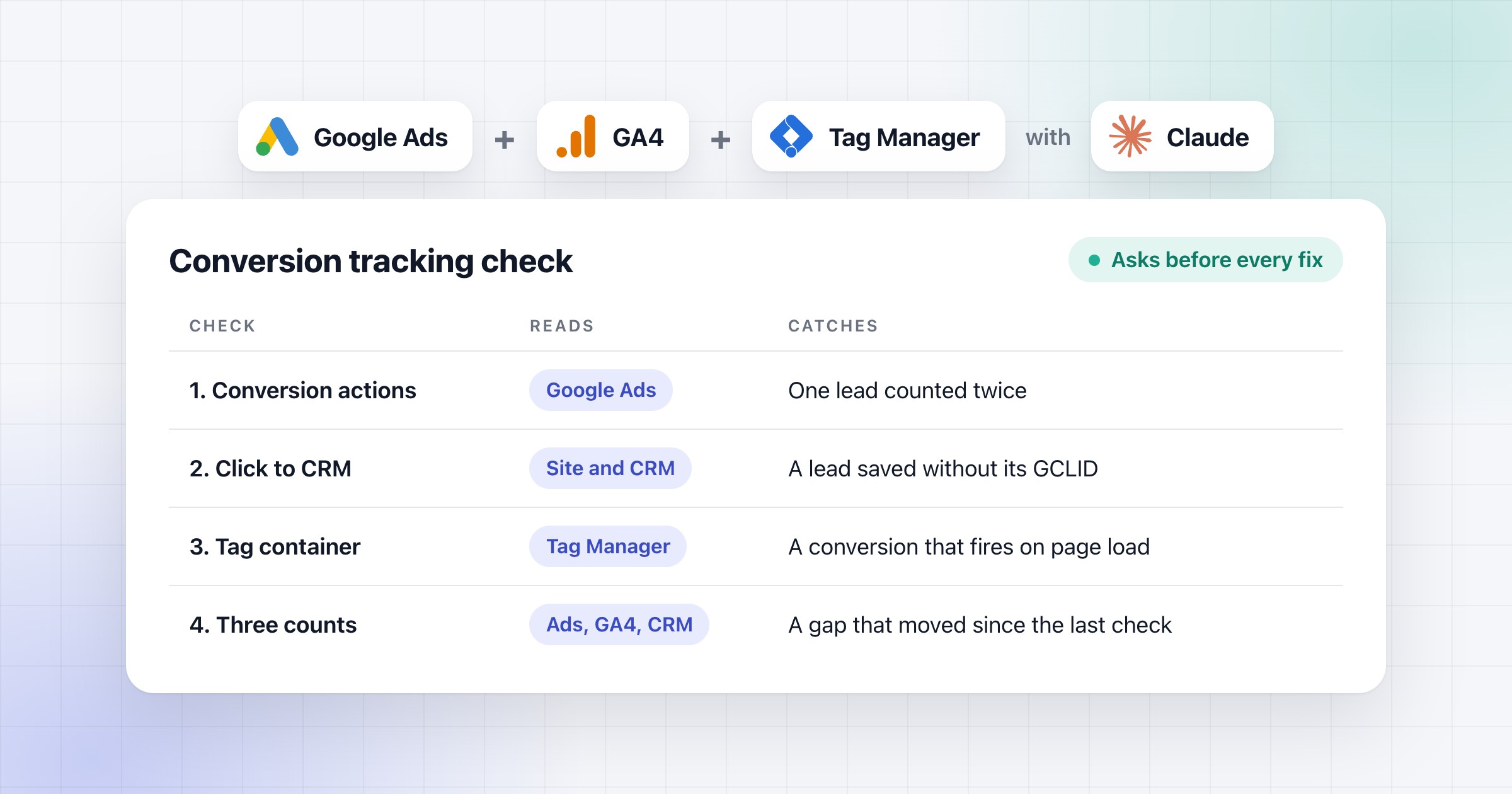
When I take over an account, I audit it first. And I check the tracking before anything else. Cost per conversion is your cost divided by your conversions, and ROAS is your conversion value divided by your cost. So if the tracking is wrong, every bid built on those numbers is wrong too, and I don't change bids, budgets or targets that rely on those numbers until it's fixed.
I put three counts side by side for the same dates: Google Ads, GA4 and the client's own record of leads or orders. I never blend them into one number, because each one counts something different. The full check is in the conversion tracking article.
I once gave Claude Code access to an account I'd set up myself and asked for an audit with no structure at all. It worked out on its own what a good audit looks like and how the Google Ads API works. In one go it found sitelinks leading to a slightly different product, a lot of missing negative keywords and tracking issues that are very hard for a person to catch.
A written checklist makes it run the same way on every client. It's 49 checks in ten areas over the last 90 days. It runs when we take over an account, every quarter, and whenever the weekly report shows a problem it can't explain.
How a change gets approved
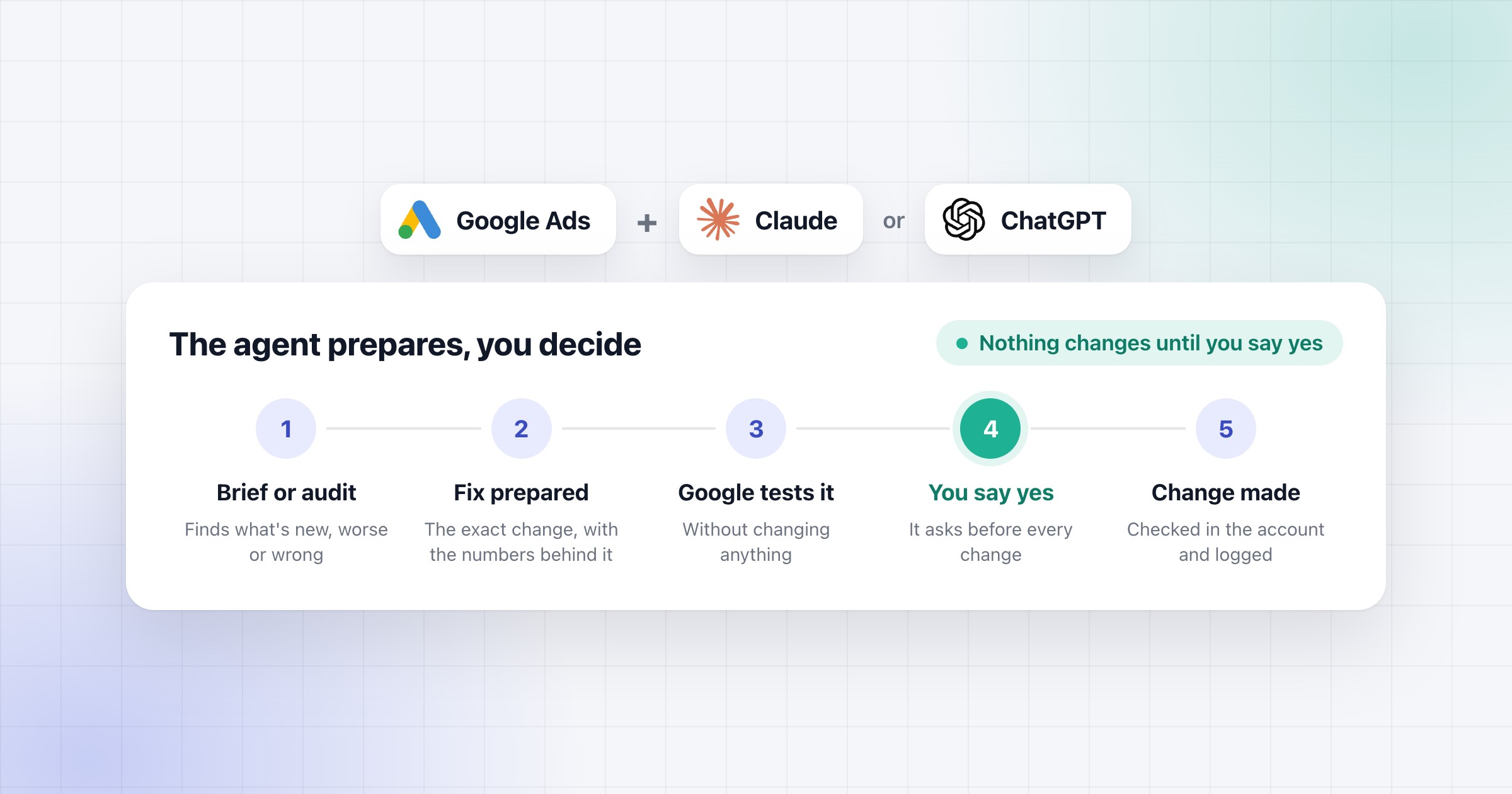
Nothing goes into a client's account until someone on the team says yes. A budget change moves the client's money, so I want a yes before it happens.
Every change goes the same way:
- The agent prepares the change, with the numbers and dates behind it. It doesn't restructure a campaign that's still in its learning period, unless there's a written reason.
- Google tests it first, which doesn't change anything yet. So if Google would reject it, we usually know before anyone has to look at it.
- It asks you. You see the changes on a page, with an Approve and a Skip on each, so you can say yes to some and not to others.
- You say yes, and it makes the change. Then it checks that the account shows exactly what you approved.
- It logs the change, with what was there before, why we changed it and who said yes.
That's how we work on the accounts we manage, and it's what we set up for agencies. We keep our own log, because the change history the AI reads through Google's API only shows 30 days, and we keep ours longer.
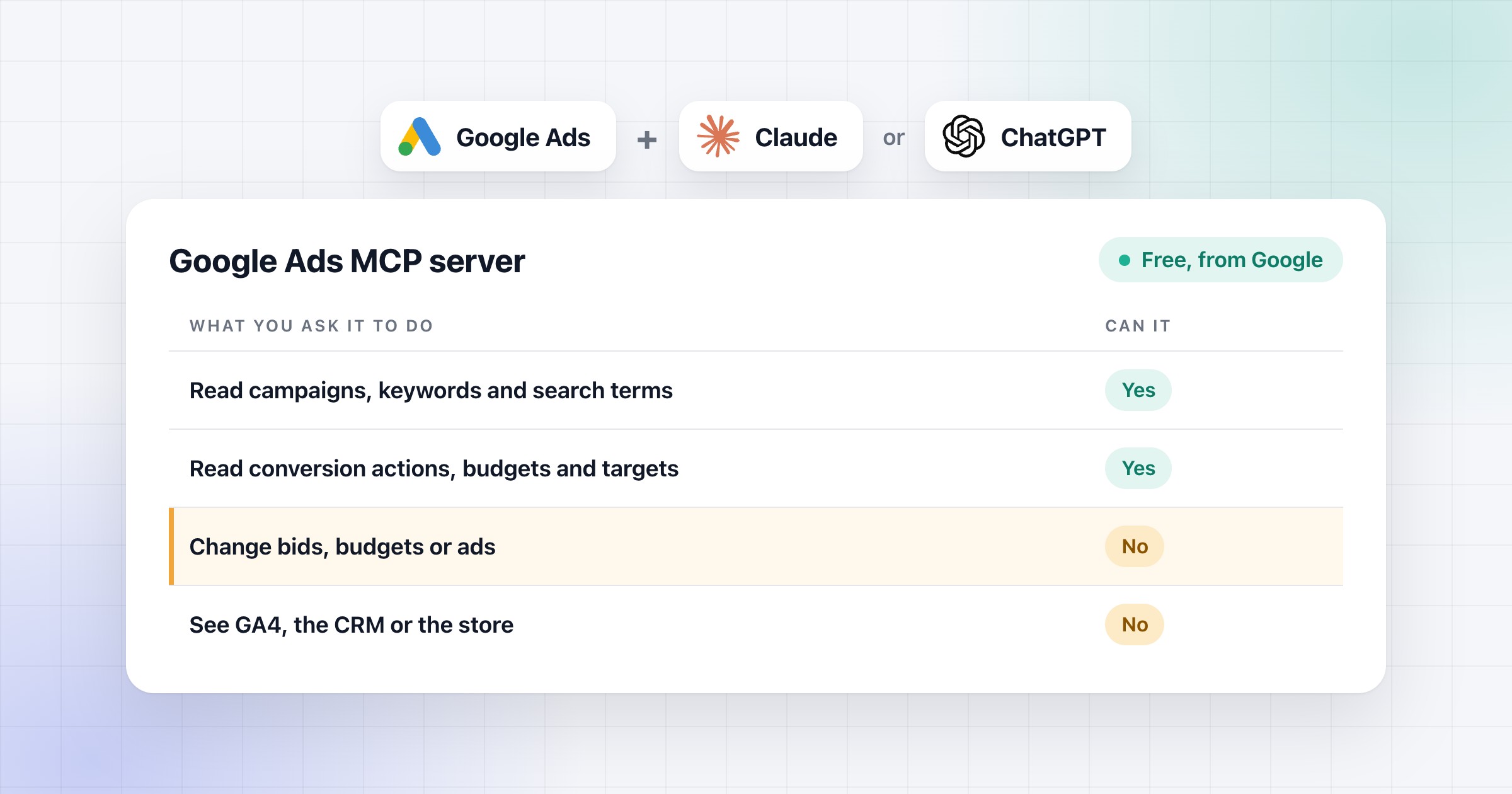
Google says its Google Ads MCP server is read-only, so it can't change anything in the account. So the part that makes the change, checks it and logs it is something we add on top.
How the weekly report and client reports work
Once a week I look at every client on one page. It compares each client's last 7 days with the 4 weeks before, allowing for conversion lag. It puts every change we made next to the number it was meant to move, and it suggests the next change.
Once a month, the agent drafts every client's report in one batch, in the client's language. Code works out every number, the agent writes the words, and someone on the team sends it. The report never claims a change that isn't in our change log.
When a number moves, the agent follows it from the search to the form and comes back with the cause, or with "not proven yet". I'd rather send a client "not proven yet" than a guess.
I think the strongest case against agencies is where the platforms say advertising is going. In May 2025, Meta's CEO Mark Zuckerberg told Stratechery he expects a point where a business connects its bank account and needs no creative, no targeting and no measurement. What's left, in his words, is the need "to be able to read the results that we spit out". That's the platform's own count. Checking it against GA4 and the client's records is exactly where my audit starts.
Google announced its own agent, Ask Advisor, on 20 May 2026. It works across Google Ads, Google Analytics, Merchant Center and Google Marketing Platform. In October 2026, Google says it's still in beta, it makes changes "with your approval", and it doesn't work in manager accounts. So it can't look at every client from one place. That's why I think checking every client account each morning is still the agency's job.
The platforms are right that the reading and the first drafts move to the agent. In my setup they already have. What stays with the agency is the decision, and a yes on every change.
What your specialists still do
Your specialists decide what goes into the account, and why. The agent does the reading and prepares the changes. The decisions behind the account stay with your team:
- budgets, bids, bid strategies, pausing and targeting
- the targets, offers and prices
- the ad copy and the claims in it
- legal and disclosure calls
Once they decide, the agent makes the change.
I don't think any work has to stay human forever. I also don't believe in switching on autopilot everywhere today. People still do two kinds of work. The first is what AI can't do well enough yet, and that list keeps getting shorter. The second is anything where a single mistake is too expensive, like a client's budget.
The work stays the same. You run the account, find what's wrong and improve it. What changes is how it happens, and I believe the person who did that work can now serve more clients, with better service.
If you want this routine for your agency, we start with an audit done together on one of your client accounts.