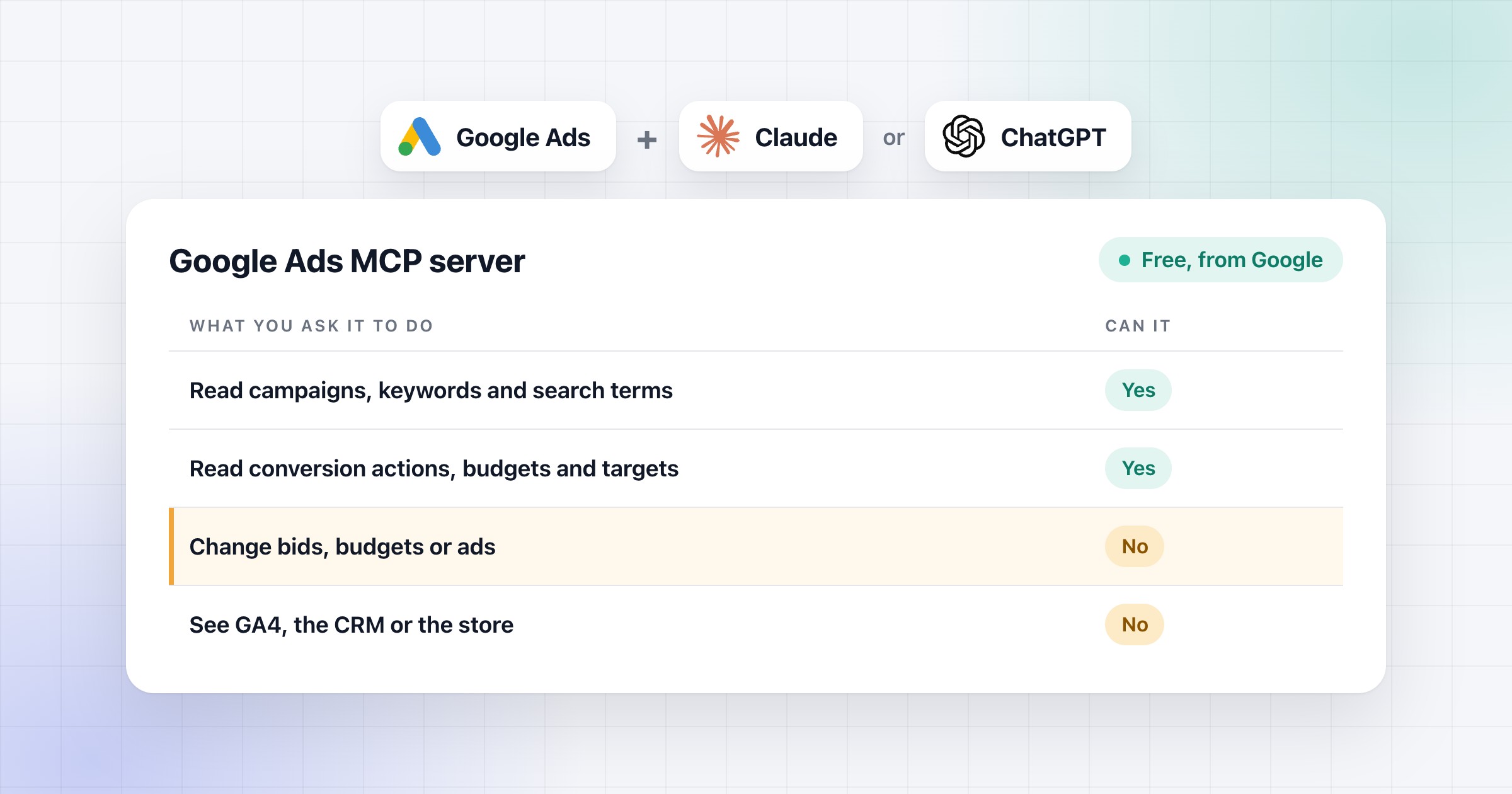
Google's Google Ads MCP server is a free tool that connects Claude, ChatGPT or another AI assistant to your Google Ads accounts. You ask a question in plain words, and it pulls the numbers and answers. It reads the account, but it can't change anything in it.
MCP is an open standard for connecting AI assistants to other tools, and this is Google's own server for it. I've managed €5M+ of ad spend over 10+ years, and I always read an account before I touch it.
In short:
- It reads campaigns, search terms and conversions in every account your login opens, and it can't change anything.
- It only sees Google Ads, so it can't tell you whether a sale really happened.
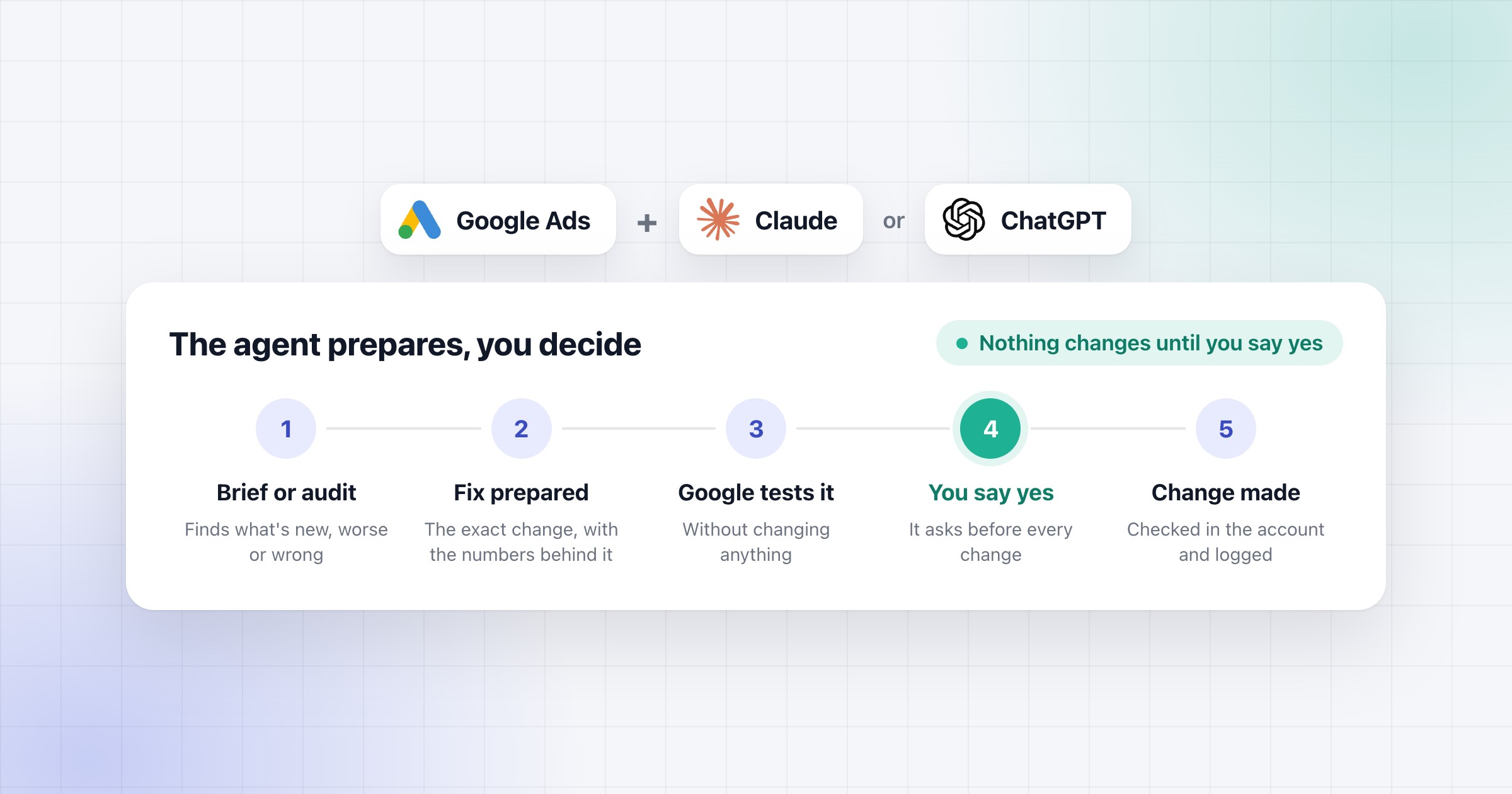
- For changes, we add our own connection next to it. Claude asks, you say yes, and it makes the change and checks it.
- Setup is a Google Cloud project with Explorer access, an OAuth client, one sign-in command and one block in your AI app.
What the Google Ads MCP server can do
It reads your data in every account your Google login opens, including the ones under your manager account. Google lists more than 180 kinds of data it can pull, for example:
- campaigns, ad groups, keywords and ads, with their numbers;
- the search terms report;
- your conversion actions, and what each one counts;
- budgets, bid strategies and targets;
- Performance Max, Shopping, landing pages and locations.
So you can ask it what you'd ask a colleague, such as "Which search terms cost money and never converted?"
Just reading an account is worth a lot, whatever connects the AI to it.
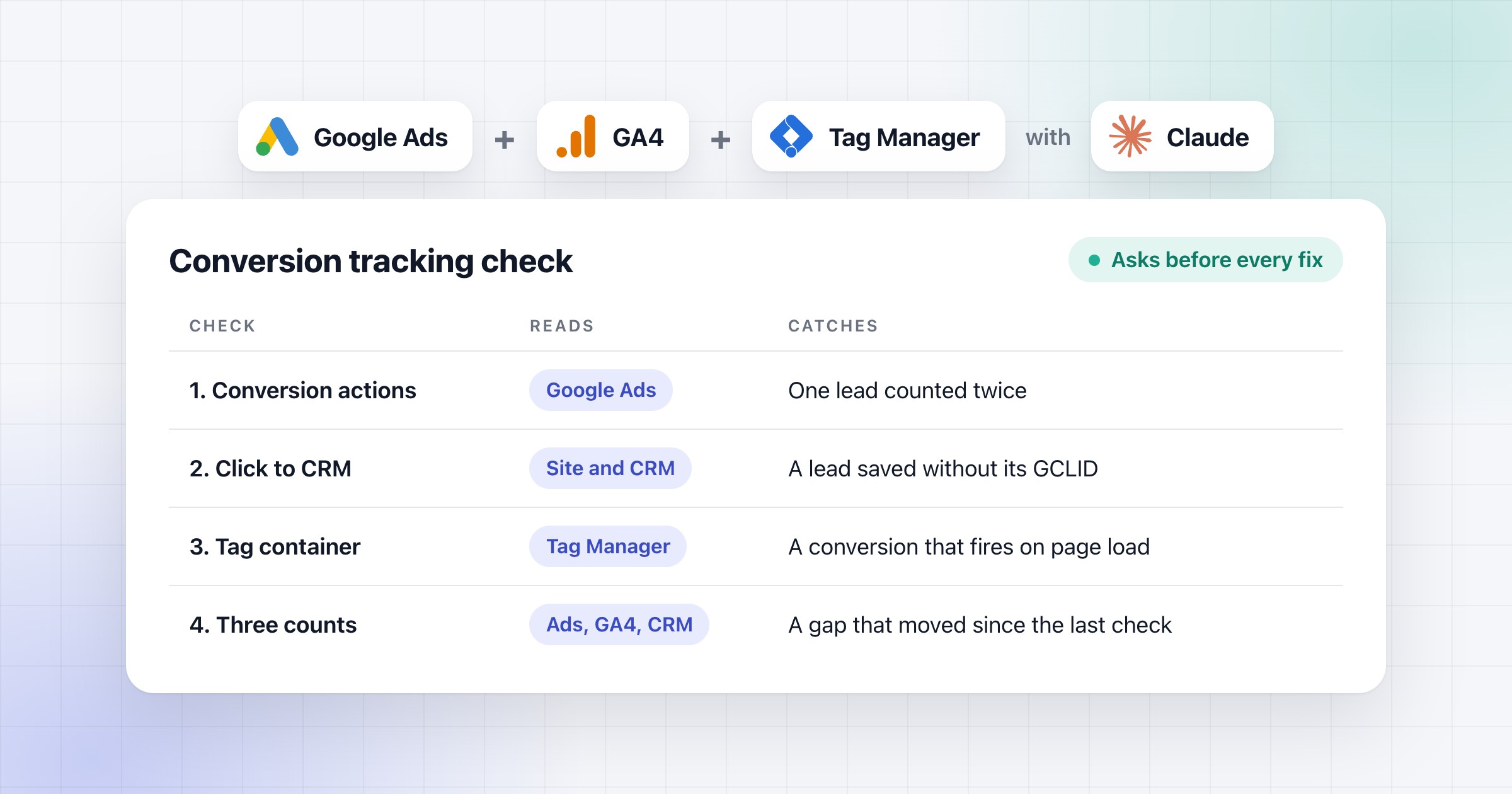
On one of my own accounts, a first audit with no structure at all found tracking issues that are very hard to catch by hand. I tell that story in how PPC agencies use AI agents.
A first-read prompt to paste into Claude or ChatGPT
This is what I ask for first on a new account: conversions, then the money. Fill in the account and your target, and paste it as it is. The page is a Claude artifact, so in ChatGPT ask for a table in the chat instead. Google's server only reads, so on its own Claude stops at the page and changes nothing. Below is Claude's answer on a sample store's account, in the setup we build for clients, where Claude also makes the changes once you say yes.
What it can't do, and how to keep the account safe
Google built this version to read only. Google's guide says it "cannot modify bids, pause campaigns, or create new assets". That leaves out a few things.
- No changes. It can't change bids or budgets, pause anything, or add ads, keywords or negatives.
- Only Google Ads. It can't see GA4, your CRM or your store. So it knows what Google Ads counted as a sale, but not if the sale happened.
- Some data stays out. Google's API doesn't give it Auction Insights. The change history it reads only goes back 30 days and can miss changes you see in the interface. Low-volume search terms stay hidden, like in Google Ads.
- It only answers when you ask. For a check every morning, you need something that asks for you on a schedule.
The server is read-only, but your login isn't. When you sign in, the app gets everything your Google Ads user can do, because Google has no read-only option for apps. So I keep the sign-in as safe as a password. If you just want it to read, sign in with a Google Ads user that has Read-only access, which Google's roles say can't edit campaigns.
How to make changes, add GA4 and run daily checks
For changes, we add our own connection next to Google's server. It works through Google's API, and it's what we set up for clients.
| You want to |
Use this |
| Let Claude make the changes |
What we set up for clients. Claude asks, you say yes, and it makes the change and checks it. |
| Read GA4 next to Google Ads |
Google's Google Analytics MCP server, which is still experimental. It can only read too. |
| Check every account each morning |
A setup that asks the same questions on a schedule, the way agencies run it. |
In that setup, Claude has Google test each change first and makes it only after your yes. It also logs what each change replaced, so any of it can be put back.
Without a setup like this, you make the changes yourself or import them into Google Ads Editor.
How to connect it to Claude or ChatGPT on your computer
You set it up once, and it runs on your computer with your own Google access. The server and Google's API cost nothing.
1. Install pipx. It runs the server for you, and it needs Python 3.10 or newer. On a Mac with Homebrew, run this in the Terminal, then open a new Terminal window.
brew install pipx
pipx ensurepath
On Windows, install Python 3.10 or newer from python.org. Then run this in the Command Prompt, and open a new one.
py -m pip install --user pipx
py -m pipx ensurepath
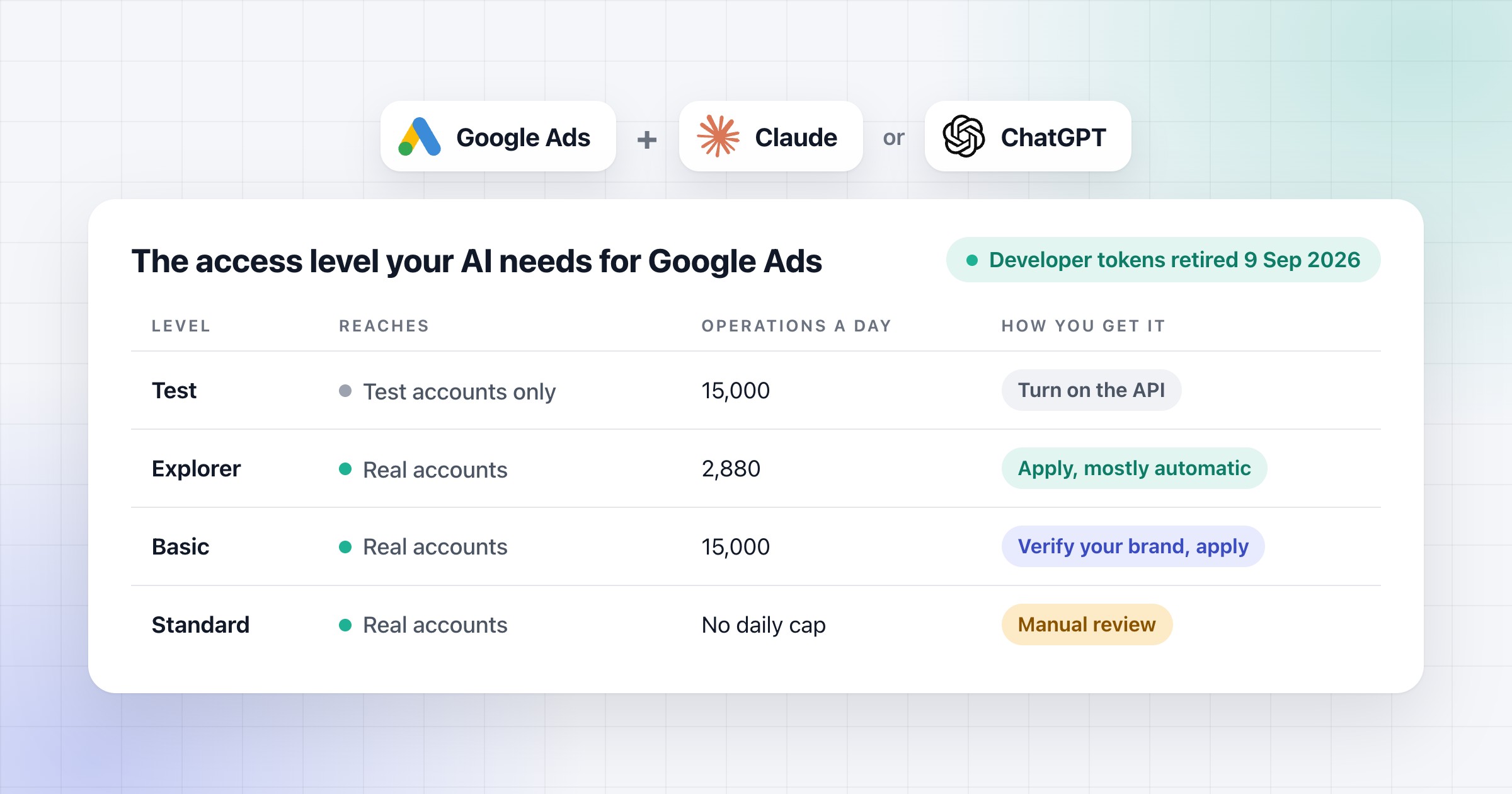
2. Turn on the Google Ads API. Open the Google Ads API in the Google Cloud console, create a project when it asks and click Enable. Open the project picker at the top and copy the project ID, not the name. For now the project only works with test accounts.
3. Apply for Explorer access. On the Google Ads API Overview page, expand Upgrade access level, check that the next level says Explorer, and click Apply for access. Most projects get it automatically, and it gives you up to 2,880 operations a day on real accounts. If you're turned down, check billing, because Google can reject a project on the free trial. Upgrade it to a paid account and apply again. If an older project that used the API before 9 September gets an authorization error on real accounts, Google says to apply in a new project.
4. Set up the sign-in screen. In the console menu, open Google Auth Platform, then Branding, and click Get started. Give the app a name and your email. For Audience, pick Internal if your Google account is on Google Workspace and the project is in your organization. Otherwise pick External. Add your email as the contact, agree to the policy and click Create. With External, open Audience and add your email under Test users.
5. Create the OAuth client. In Google Auth Platform, open Clients and click Create client. Choose Desktop app as the type, then click Create. Download the JSON file right away, because Google shows the secret only once.
6. Sign in once. Install the Google Cloud CLI from Google's install page. Then run this line in the Terminal, with the path to your JSON file at the end.
gcloud auth application-default login --scopes https://www.googleapis.com/auth/adwords,https://www.googleapis.com/auth/cloud-platform --client-id-file=/Users/yourname/Documents/client_secret.json
Sign in with the Google account that opens your Google Ads accounts. If Google warns that the app isn't verified, that's normal for your own app, so continue and allow access. Then copy the path the Terminal prints after "Credentials saved to file". On Windows the file is in %APPDATA%\gcloud, and you write its path with forward slashes in the blocks below. With External in Testing, Google ends the sign-in after 7 days, so run the line again when the server stops answering.
7. Add the server to your AI app. Each block needs your manager account's ID without dashes, the path from step 6 and your project ID. If you don't use a manager account, delete the manager line, or the first -e part of the Claude Code line. I'd pin the version, so the server doesn't change on you. The blocks run 0.0.5, the newest version, released on 9 October 2026.
For Claude Desktop, first run which pipx in the Terminal (where pipx on Windows). Put the full path it prints in place of "pipx" in the block, because Claude Desktop often can't find pipx by name. Then open the Claude menu, then Settings, Developer and Edit Config. Paste the block into that file (inside its mcpServers, if it already has some), save it, quit Claude completely and open it again.
{
  "mcpServers": {
    "google-ads-mcp": {
      "command": "pipx",
      "args": ["run", "--spec", "google-ads-mcp==0.0.5", "google-ads-mcp"],
      "env": {
        "GOOGLE_ADS_LOGIN_CUSTOMER_ID": "1234567890",
        "GOOGLE_APPLICATION_CREDENTIALS": "/Users/yourname/.config/gcloud/application_default_credentials.json",
        "GOOGLE_PROJECT_ID": "your-project-id"
      }
    }
  }
}
For Claude Code, run this line. The --scope user part makes it work in all your projects.
claude mcp add google-ads-mcp --scope user -e GOOGLE_ADS_LOGIN_CUSTOMER_ID=1234567890 -e GOOGLE_APPLICATION_CREDENTIALS=/Users/yourname/.config/gcloud/application_default_credentials.json -e GOOGLE_PROJECT_ID=your-project-id -- pipx run --spec google-ads-mcp==0.0.5 google-ads-mcp
For Codex and the ChatGPT desktop app, which share one setup, add this to config.toml in the .codex folder of your user folder. If the server doesn't show up, restart the app. The 60 seconds give the first start time to download the server.
[mcp_servers.google_ads]
command = "pipx"
args = ["run", "--spec", "google-ads-mcp==0.0.5", "google-ads-mcp"]
startup_timeout_sec = 60

[mcp_servers.google_ads.env]
GOOGLE_ADS_LOGIN_CUSTOMER_ID = "1234567890"
GOOGLE_APPLICATION_CREDENTIALS = "/Users/yourname/.config/gcloud/application_default_credentials.json"
GOOGLE_PROJECT_ID = "your-project-id"
8. Test it. Ask "What customers do I have access to?", then ask for last week's cost in one account, by its ID. If it matches what you see in Google Ads, it works.
How to connect it to Claude or ChatGPT in the browser
Claude and ChatGPT in the browser can't reach a server on your computer. They connect from their own cloud, so the server has to be online. Google's way is to put it on Cloud Run in your own project. If you're not technical, I'd leave this part to a developer.
- In Google Auth Platform, create another OAuth client, this time a Web application. Add these two under Authorized redirect URIs, the first for Claude and the second for ChatGPT. Then copy the client ID and secret.
https://claude.ai/api/mcp/auth_callback
https://chatgpt.com/connector_platform_oauth_redirect
- Under Data Access, add the Google Ads scope, and under Audience, add everyone who will connect as a test user.
- Then run these lines in the terminal, with your own values. Delete the manager ID if you don't have one. The last line is for after the first deploy, with the address Cloud Run gives you.
git clone https://github.com/googleads/google-ads-mcp.git
cd google-ads-mcp
gcloud config set project YOUR_PROJECT_ID
gcloud artifacts repositories create mcp-servers --repository-format=docker --location=us-central1
gcloud builds submit --tag us-central1-docker.pkg.dev/YOUR_PROJECT_ID/mcp-servers/google-ads-mcp:latest .
gcloud run deploy google-ads-mcp --image us-central1-docker.pkg.dev/YOUR_PROJECT_ID/mcp-servers/google-ads-mcp:latest --platform managed --region us-central1 --allow-unauthenticated --set-env-vars="GOOGLE_PROJECT_ID=YOUR_PROJECT_ID,GOOGLE_ADS_MCP_OAUTH_CLIENT_ID=YOUR_CLIENT_ID,GOOGLE_ADS_MCP_OAUTH_CLIENT_SECRET=YOUR_CLIENT_SECRET,GOOGLE_ADS_LOGIN_CUSTOMER_ID=1234567890,FASTMCP_HOST=0.0.0.0"
gcloud run services update google-ads-mcp --region us-central1 --update-env-vars="GOOGLE_ADS_MCP_BASE_URL=https://your-cloud-run-url.a.run.app"
- In Claude or ChatGPT, add a custom connector with that address plus /mcp, pick OAuth and paste your client ID and secret.
Never deploy it without the OAuth client. Google warns that without it, anyone with the address can use the server's own Google access. For ChatGPT there's one more way, OpenAI's Secure MCP Tunnel, which reaches the server on your computer without putting it online.
Before you connect client accounts, make sure their data only goes through business plans, such as Claude Team or ChatGPT Business. Google's rules on hosted servers are in the API access article.
Companies are opening their tools to AI through MCPs, and Google opened the reading first. I think that's the right order, because reading changes nothing in the account. The next step is to run this check on every account, every morning.