Time Booster
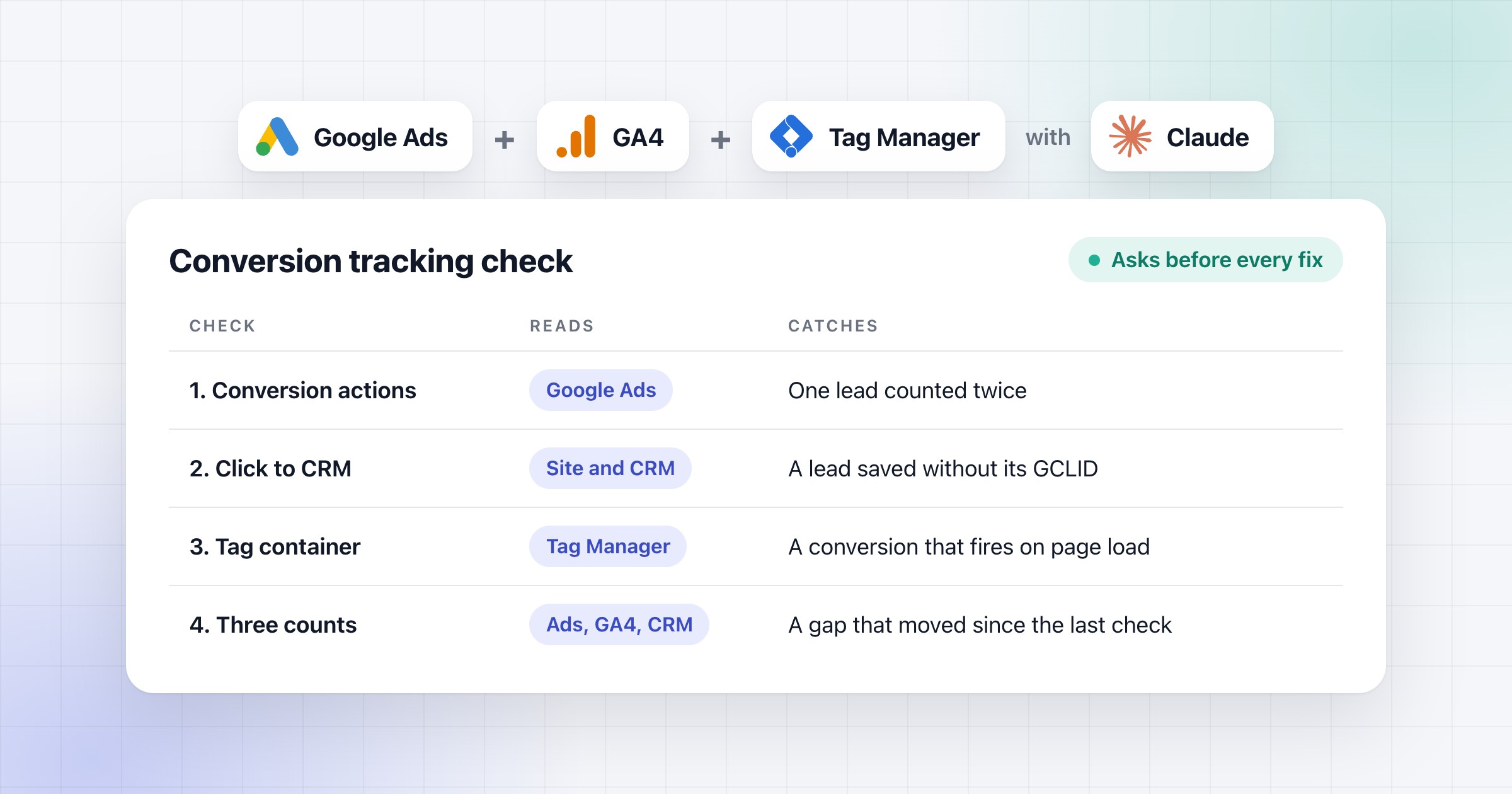
Google Ads, GA4, Tag Manager and Claude logos above a table of the four conversion tracking checks, what each one reads and what each one catches, such as one lead counted twice, with a chip that says it asks before every fix
Paid ads· 10 min read

Check Google Ads conversion tracking with AI against GA4, GTM and the CRM

How I check Google Ads conversions against GA4, Tag Manager and the CRM, with a prompt for Claude or ChatGPT that finds what's broken and asks before fixing it.

Ivan Tsekov

Written by

Ivan Tsekov

Founder, Time Booster

Before building growth engines that AI agents keep running, Ivan spent more than 10 years in performance marketing: Google Ads, Meta ads, email and funnels for B2B and B2C companies, with over €5M in ad spend managed and the full funnel owned from first click to closed deal.

Follow on LinkedIn

On this page
  1. 1.A tracking check prompt to paste into Claude or ChatGPT
  2. 2.How to see which conversions bidding really uses
  3. 3.How to follow a click from the ad to the CRM
  4. 4.How to read what the tag container counts
  5. 5.When a gap between Google Ads, GA4 and the CRM is a problem
  6. 6.What to do when a count breaks
  7. 7.Questions people ask

I check Google Ads conversion tracking in four steps. First what each conversion action counts, then whether the click reaches the CRM, then what the tags fire on, and last how the three counts compare. Claude or ChatGPT can run all four with one prompt. In the setup we build for clients, Claude is connected to all four tools, and it asks before it fixes anything.

I've managed €5M+ of ad spend over 10+ years. When I take over an account, I check the tracking before I look at any cost, because a cost per conversion is only as right as the conversions behind it. Here's that check as a prompt, what it finds on a sample account, and what each step looks for.

In short:

  • Cost per conversion is your cost divided by your conversions. If the conversions are wrong, every cost is wrong too, so I check them first.
  • Bidding only uses a conversion action if it's set as primary and the campaign bids on its goal. A custom goal can use it too.
  • Google Ads, GA4 and the CRM rarely match, and Google says some gap is expected. What matters is whether the gap changed compared with the weeks before.
  • When the numbers break, I first find the step where they started to drop. Only then do I fix anything.

A tracking check prompt to paste into Claude or ChatGPT

This prompt runs the four checks in order and finds what's broken. Fill in the goals your campaigns bid on and paste it as it is. It works best when it's connected to Google Ads, GA4, Tag Manager and your CRM, which is how we set Claude up for clients (here's how to connect Google Ads). Without those connections, attach an export of each, and you make the fixes yourself.

Below is what it does on a sample B2B software company. Claude puts the issues on one page, with each fix to approve or reject, and makes the ones you say yes to.

The prompt
Check my Google Ads conversion tracking against GA4, Tag Manager and my CRM.

Period: the last 12 full weeks, Monday to Sunday, ending at least 2 days ago, the same in every source.
Goals my campaigns bid on: <your account-default goals, and any goal a campaign sets for itself>
A Google Ads lead in the CRM has a GCLID, or UTM source google and medium cpc.

Open with the finding that matters most, in two lines. Then:
1. Conversion actions: what each one counts, primary or secondary, its Count setting and whether bidding uses it. Flag two primaries for one lead, a lead action on Every instead of One, and a primary with nothing in 30 days.
2. The click: the share of Google Ads leads in the CRM with a GCLID, by week and by form. Say where it gets lost and whether qualified leads go back to Google Ads.
3. The tag container: what each conversion tag fires on. Flag a tag that fires on page load or on every page instead of on a successful submit.
4. The three counts by week, side by side: Google Ads conversions from the actions bidding uses, GA4 key events from google / cpc, and CRM Google Ads leads. Judge the gap against this account's earlier weeks, and flag it only if it moved or Google's documented causes don't explain it.
5. If a count broke: the step where it first changed, the day it started, and what changed with it.
6. The fixes, most urgent first. If an action counted the wrong thing, put the right count in a new action and leave the old one secondary. Say whether the broken dates need a data exclusion, which takes a start and an end date and isn't meant for long breaks, and what to do instead if not.

Keep it short, use the words from the Google Ads, GA4 and Tag Manager interfaces, keep tables to 5 columns, and check every sum. Where the data can't show something, name the setting to check.
Show it as one page (an artifact), with an Approve and a Reject on each fix. Change nothing until I say yes. When I say yes, make the fixes and check them in Google Ads and Tag Manager.
Example
Check my Google Ads conversion tracking against GA4, Tag Manager and my CRM. …

Since 31 Aug, Google Ads has been bidding without 76 of the 134 Google Ads leads in your CRM: the new Get a demo form on /pricing and the /lp/ pages fires no primary conversion action and passes no GCLID.
Search | CMMS | Generic and Search | Preventive maintenance are hit hardest, 41 of 45 and 21 of 23 leads uncounted, while each Book a demo lead still counts twice.

Conversion tracking checkclaude.ai/code/artifact/fe07e047…

claude.ai/code/artifact/fe07e047-e806-0dda-bb83-76b0e67d9339
Google Ads · GA4 · Tag Manager · CRM

No primary action counts the new Get a demo form: 76 of 134 Google Ads leads since 31 Aug

Sample B2B software company · Submit lead forms · 20 Jul to 11 Oct 2026, 12 weeks

Leads no primary action counts76of 134 Google Ads leads since 31 Aug, all Get a demo
Google Ads conv. per CRM lead0.912.13 before 31 Aug; GA4 held at 0.88
Get a demo leads with a GCLID0 of 76Book a demo: 170 of 177, 96.0%
Search | CMMS | Generic, uncounted41 of 45leads since 31 Aug; Preventive maintenance: 21 of 23

Where it broke: the Google Ads count, on 31 Aug

Tag Manager version 48, named Get a demo form on pricing and landing pages, added the form's trigger to the GA4 tag but to no primary Google Ads tag. Google Ads fell from 2.13 conversions per CRM lead to 0.91; GA4 held at 0.89 and 0.88, a steady gap …

Google Ads conversions per CRM Google Ads lead, by week
2.171.972.212.162.082.220.970.900.980.780.970.86
20 Jul31 Aug5 Oct

Since 31 Aug: Tag Manager version 48, the Get a demo form

Week ofGoogle Ads conv. (primary)GA4 key eventsCRM Google Ads leadsWith a GCLID
20 Jul43.40182019 (95.0%)
27 Jul37.45161918 (94.7%)
3 Aug48.56202221 (95.5%)
10 Aug41.10181919 (100.0%)
17 Aug45.67182221 (95.5%)
24 Aug37.72161716 (94.1%)
31 Aug21.26202210 (45.5%)
7 Sep19.8419228 (36.4%)
14 Sep22.45202311 (47.8%)
21 Sep18.0420239 (39.1%)
28 Sep22.2520239 (39.1%)
5 Oct18.0119219 (42.9%)
Total375.75224253170 (67.2%)

Conversion actions and their tags

Two primaries count each Book a demo lead, two lead actions are on Every, and no primary counts Get a demo. No primary is empty in the last 30 days.

Conversion actionIts tag fires onPrimary or secondaryCountBidding uses it
Demo request - form submitForm Submission of the Book a demo form on /demo, Check Validation onPrimaryOneYes
Demo thank-you pagePage View of /demo/thank-you: the same lead again, and every reloadPrimaryEveryYes
Get a demo - embedded formCE - demo_form_submit and All Pages: every page loadSecondaryEveryNo
www.example.com - GA4 (web) generate_leadGA4 event on both forms' submitsSecondaryOneNo

Fixes, most urgent first

No data exclusion: the break has run 7 weeks since 31 Aug, and data exclusions are for short outages. Instead, after the fixes check each campaign's bid strategy: a Target CPA set before 31 Aug was set on 2.13 conversions per lead, about half the cost per lead once each lead counts once.

Fix76 leads since 31 Aug

Count Get a demo submits in a new primary action

NowNo primary action counts Get a demo
AfterGet a demo - form submit: primary, Count One
New action: Get a demo - form submitNew tag on CE - demo_form_submitPause the Get a demo - embedded form tag
Why
76 of 134 Google Ads leads since 31 Aug came through Get a demo and bidding saw none, 41 of 45 on Search | CMMS | Generic.
Evidence
GA4 counts the same submits through CE - demo_form_submit and held at 0.88 key events per CRM lead, 0.89 before 31 Aug.
Old action
Get a demo - embedded form stays secondary, and its tag is paused: it fires on All Pages, 10,809.09 All conv. in 6 weeks.
Fix198.05 conversions in 12 weeks

Make Demo thank-you page a secondary action

NowPrimary, Count Every
AfterSecondary
Why
It counts the same Book a demo lead again: 2.12 primary conversions per Book a demo lead over 12 weeks.
Keeps
Demo request - form submit stays primary: it fires on the checked submit, Count One, 1.00 per lead.
Fix0 of 76 Get a demo leads

Pass the GCLID into the Get a demo form

NowcHTML | gclid to demo form runs on /demo only
AfterIt also runs on /pricing and the /lp/ pages and fills the Get a demo form
Why
… 18 of the 28 Qualified Google Ads leads since 31 Aug came through it.
Waits for
A hidden gclid field in the Get a demo form: check the form's settings, which the data doesn't show.
New59 Qualified Google Ads leads in 12 weeks

Send Qualified leads back to Google Ads

NowNo import action in Google Ads
AfterQualified lead: import action, secondary, Count One
Why
Bidding counts … Disqualified Google Ads leads the same as … Qualified ones.
How
The CRM sends each Qualified lead with its GCLID once a day; 41 of the 59 have one, none from Get a demo.
  • Each campaign's bid strategy and target: not in what I read from Google Ads.
  • Whether CE - demo_form_submit fires only after a successful submit: GA4's steady 0.88 says once per lead, and one test submit in Tag Manager Preview confirms it.
  • If the Get a demo form loads in an iframe from another domain, the GCLID goes in through the form tool's own hidden field.

I changed nothing in Google Ads, Tag Manager or the CRM.

Want me to make all four fixes in Google Ads and Tag Manager, or only the ones you approve on the page?

Go ahead with the first two fixes today. Before the GCLID fix, I'll check with our developer that the Get a demo form has the hidden field.

Both fixes are live, and I read each change back from Google Ads and Tag Manager. Every one matches:

Where What changed
Google Ads New conversion action Get a demo - form submit: Submit lead form, Count One, primary in Submit lead forms
Google Ads Demo thank-you page is now a secondary action. Demo request - form submit stays primary
Tag Manager New Google Ads tag for that action, fired only on CE - demo_form_submit. The Get a demo - embedded form tag is paused. Version 49 is published

Next: … On Monday I'll compare the week's Google Ads conversions with the CRM's Google Ads leads. They should come to about one per lead (0.91 now). Then I'll check each campaign's bid strategy target. The GCLID fix waits until your developer confirms the hidden field.

Reply to Claude…
The prompt above, run in Claude on a sample B2B software company's connected accounts. Example numbers.

The Qualified lead import on the page starts as a secondary action, so you can see how many uploads match before bidding uses them. Once they match, I make it primary. That's when bidding stops counting a disqualified lead the same as a qualified one.

How to see which conversions bidding really uses

Bidding only uses a conversion action if it's primary and the campaign bids on its goal. Google says both have to be true. A secondary action only counts for bidding inside a custom goal. So a primary action in a goal that no campaign uses doesn't change a single bid.

I start with the Status column on the conversions Summary page, under Goals, Conversions, Summary. Google shows 'Misconfigured' when conversions have stopped recording completely, and 'Awaiting conversions' when none came in the last 7 days. Then I go through each action and flag these:

  • A primary that counts something other than the lead, for example a page view.
  • Two primaries that count the same lead, which doubles what bidding sees.
  • A lead action on Count 'Every'. That's the default for website actions, but Google says to use 'One' for leads, so a page refresh doesn't count twice.
  • A primary with no conversions in 30 days. That's my own line for a dead action.
  • A call action that counts short calls as leads.

How to follow a click from the ad to the CRM

The GCLID is what ties an ad click to a lead. So I follow it into the CRM, and back to Google Ads. It's only there if auto-tagging is on, which adds it to the landing page address after a click. Google says auto-tagging is required for website conversion tracking. After that, it can break in four places:

  1. A landing page without the sitewide tag. Google says some clicks that land there can't be tracked.
  2. Consent. If your visitors are in the EEA, the UK or Switzerland, Google needs their consent signals.
  3. The form. Google's steps add a hidden GCLID field to each form, so the CRM saves it with the lead.
  4. The way back. If qualified leads never go back to Google Ads, that's a problem, because then Google Ads never sees which clicks turned into real leads.

To check it, I count how many Google Ads leads in the CRM have a GCLID, by week and by form. For example, a form where that share falls to zero is where the GCLID gets lost.

To send qualified leads back, each form needs that hidden field, and the CRM has to save the GCLID with each lead. Then you create an offline conversion action in Google Ads. Go to Goals, Summary, click + Create conversion action, pick Conversions offline, then Add data source, Continue and Connect a new data source. There you connect your CRM, either directly or through a partner integration. Then wait 4 to 6 hours before you upload the first ones.

I also make sure enhanced conversions are on. Google's setup page says web and leads now share one on/off setting. If your tags run on the Google tag, go to Goals, Settings, open Enhanced conversions and tick Turn on enhanced conversions. Then agree to the customer data terms, pick Google tag as the method and click Save. If your site uses Tag Manager, Google has a separate setup for it.

How to read what the tag container counts

On a site with Tag Manager, Tag Manager decides what counts as a conversion. So I read the live container before I trust any count. The container that loads on your site is public, so a connected agent can read it straight from the page.

There are two rules that decide when a tag fires.

  • A tag fires when any one of its triggers fires, unless one of its exceptions blocks it. So a tag with All Pages among its triggers fires on every page.
  • A trigger fires only when all of its conditions are true. So every condition you add makes it narrower.

On a form trigger, Google says 'Check Validation' makes it fire only when the form is sent successfully. That only tells you the page accepted the form. To see the lead reach the CRM, I also send one test lead in Tag Manager's Preview. I flag any conversion tag that fires on page load or on every page instead of on a successful submit.

Before I say conversions are lost, I check which forms are on which landing page, because a trigger only matters on a page that has a form we count. Then I test each form in Tag Manager's preview mode.

  1. In the Workspace tab, click Preview, top right. Tag Assistant opens in a new tab.
  2. Enter the landing page's address and click Connect. The page opens in a new window.
  3. Fill in the form there and send it, the way a visitor would.
  4. Go back to the Tag Assistant tab and click Continue. It shows which tags fired, in which order, and what triggered each one.

When a gap between Google Ads, GA4 and the CRM is a problem

Google Ads, GA4 and the CRM rarely show the same number. So I only call a gap a problem when it changed since the last check, or when Google's usual reasons don't explain it. I keep the three side by side, week by week, and I never average them into one "real" number.

Google says a gap of "often up to 20%" between Google Ads and analytics is expected. I don't use that number. I compare each gap with the same account's earlier weeks, and I care when it moves either way. For example, a gap that suddenly closes can be two problems cancelling each other out: one lead counted twice, hiding a form nobody counts.

These are the reasons Google gives that I look at first.

Reason What it does to the counts
Date Google Ads counts on the day of the click, GA4 on the day of the conversion
Column 'Conversions' shows primary actions, 'All conversions' adds the secondary ones
Counting 'One' or 'Every' in Google Ads, 'Once per event' or 'Once per session' in GA4
Cookies Google Ads cookies expire 90 days after the click, Analytics' last up to 2 years
Late data Google Ads can lag 24 to 48 hours, and GA4's credit can shift for up to 12 days
Own clicks Google Ads only reports conversions after an interaction, such as a click, from the same account

Even a clean split by channel can fool you. When I switched off a client's Google Ads, the "organic" conversions went too. I've seen it with a few clients. People the ads brought in buy later on another device, so tracking gives the credit to the wrong channel.

What to do when a count breaks

When the numbers break, I first find where they started to drop. Only then do I fix anything. If clicks held and conversions fell, the problem is after the click.

  1. Put the numbers side by side by week, from clicks to form submits to conversions.
  2. Take the first step that dropped and split it by device, browser and landing page. If only one segment dropped, it points at the site.
  3. Find the day it started, in the change history and in any site update.
  4. Fix the cause, even when it's outside the ads. For example, when an action has been counting the wrong thing, I put the right count in a new action with its own tag and Count 'One'. Then I set the old one to secondary.
  5. Decide on a data exclusion. It tells Smart Bidding to ignore the broken dates. Google says not to use them often or for long periods, so for a break that ran for weeks, or is still running, I don't. I fix it and judge those weeks on the CRM's count. For a short break, go to Tools, Adjustments, the Exclusions tab and click the plus button. Give it a name, enter the start and end dates and the campaigns, then click Save and Create data exclusion.

On the accounts we manage, and in what we set up for clients, Claude makes these fixes too, in Google Ads or Tag Manager, each one after my yes. Then it reads the change back to check it went in right.

Google says Smart Bidding usually needs 1 to 2 conversion cycles to learn again after you change which actions it uses. That's why I decide on each fix myself. For our clients, this check is part of the full audit we run when we take over an account, and every quarter after that.

Every piece of work has a step that does it and a step that tells you how it went. In ads, that second step is conversion tracking. Once the count holds, finding wasted spend in the search terms is the next job.

Questions people ask

Why don't my Google Ads conversions match GA4?

They count differently, even when everything is set up right. Google Ads puts a conversion on the day of the click and Analytics on the day it happened, and 'All conversions' also includes the secondary actions. Google says a gap of often up to 20% is expected, so I only worry when the gap changed compared with the weeks before.

How do I check if Google Ads conversion tracking is working?

First look at the Status column on the conversions Summary page. Google says 'Misconfigured' means conversions stopped recording, and 'Awaiting conversions' means none came in the last 7 days. After that, I check what each conversion action counts and whether the click reaches the CRM. Then I look at what the tags fire on, and compare Google Ads, GA4 and the CRM week by week.

Why did my Google Ads conversions drop?

Put the numbers side by side by week, from clicks to form submits to conversions, and find the step where they started to drop. If clicks held and conversions fell, the problem is after the click. Split that step by device, browser and landing page, and find the day it started. Once it's fixed, a data exclusion tells Smart Bidding to ignore a short break, but Google says not to use them often or for long periods.

What changed with enhanced conversions for leads?

Google's setup page says enhanced conversions for web and for leads are now one on/off setting. You find it under Goals, Settings, in the Enhanced conversions section. It sends hashed first-party data from your site, which Google matches with signed-in Google accounts, and it doesn't work with conversions imported from Google Analytics goals.

Can AI check my Google Ads conversion tracking?

Yes. Claude or ChatGPT can read the conversion actions, the counts and the tags from an export of each, compare them and find what's broken. In the setup we build for clients, Claude is connected to Google Ads, GA4, Tag Manager and the CRM, so it reads them live. It asks before it changes anything, and if you say yes, it makes the fix and checks it went in right.

See which growth engines fit your company.

On the call we look at your business and your channels, and show you which engines we would build first.