I find wasted spend in Google Ads search terms the same way on every account. I take 90 days of searches and group them into themes by their words. If a theme has spent about what one conversion usually costs in that account, and brought none, it becomes a possible negative. It only goes in after I've checked it against the searches that did convert.
I've managed €5M+ of ad spend over 10+ years. On the accounts we run, Claude goes through the search terms every week and after every budget change, and adds the negatives once I say yes. Below is a prompt that follows my method, what it returns on a sample account, and the reason behind each step.
In short:
- Google leaves low-volume searches out of the report, so first check how much of the spend it shows.
- A theme becomes a possible negative once it has spent about what one conversion costs you, with none.
- Check who converted before you cut anything. A job seeker who fills in your form counts as a conversion, and Smart Bidding learns from it.
- Check each negative against 90 days of converting searches, your keywords and what buyers search for. A buyer's search blocked by mistake just drops out of the report.
A search terms prompt to paste into Claude or ChatGPT
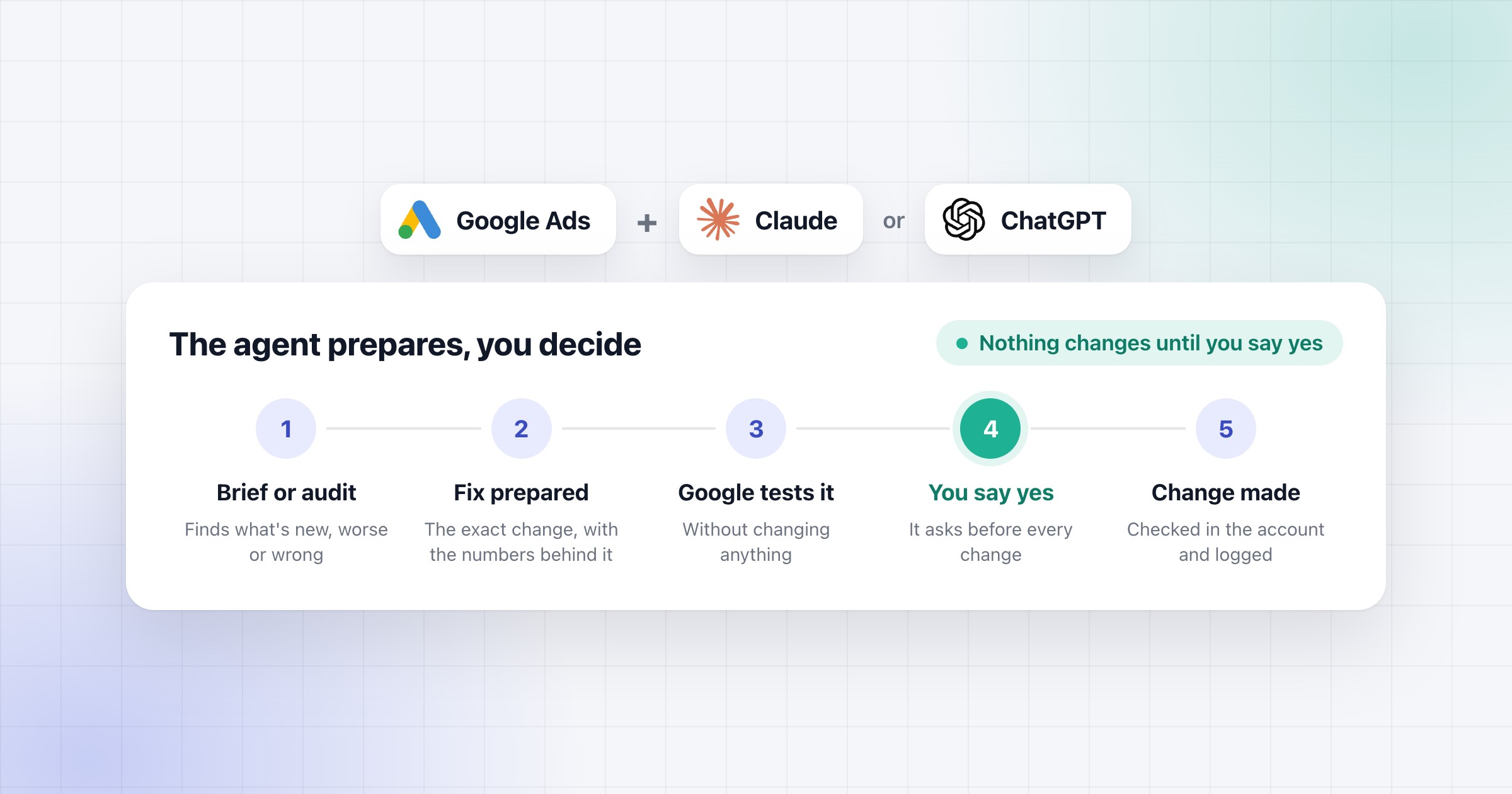
This prompt follows my method for search terms. Fill in your business, what counts as a conversion and the negatives you already have, and paste it as it is. It asks for one page with an Approve and a Reject on each change, and nothing changes until you say yes.
The prompt assumes your AI can already read your Google Ads account and your CRM, the way the example below is set up. Google's MCP server can connect Google Ads for reading, but it can't change anything, so with only that you add the negatives yourself. Below it is Claude's answer on a sample plumbing company's account, and what it does once you say yes.
How to find the searches that waste money
Group the searches into themes, then compare each theme with your cost per conversion.
First, check what the report covers. Google leaves out searches that "don't have enough query activity", for privacy reasons, and it doesn't say where that line is. Google says their clicks still count in the campaign total, so the rows in the report add up to less than the campaign. That's why I put the share of cost and conversions it shows right at the top, so I know how much of the account I'm actually looking at.
Some rows are also Google's reading of a search. For searches on Lens, AI Mode, AI Overviews or auto-complete, the report shows Google's "best approximation of the user's intent", so I check again the following week.
Then the themes. I split every search into single words and phrases of up to three words. Then I add up the cost and conversions behind each one, and merge the ones that come from the same kind of person. Words like "jobs", "course" and "supplies" rise to the top on their own.
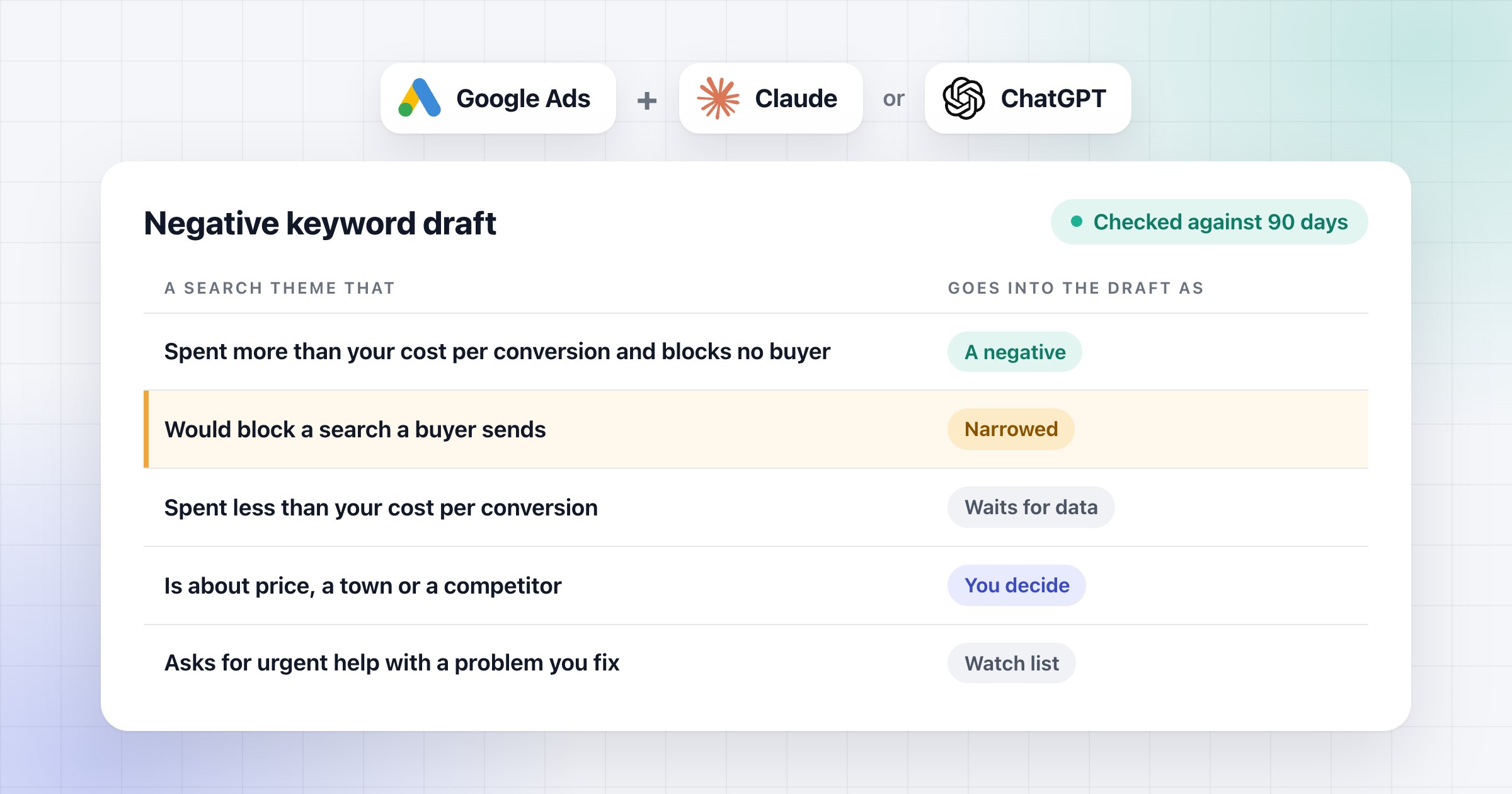
Then the line. I don't use a fixed amount spent with no conversion, because the same amount means something different in every account. My rule of thumb is simple. If a theme has spent about what one conversion usually costs in this account, and brought none, it becomes a possible negative. For example, if a lead costs you €35, a theme that spent €40 with no lead is worth a look. If a lead costs €200, the same €40 waits for more data.
Going over that line doesn't make it a negative yet. I check two more things first.
How to check who really converted
A job seeker who fills in your contact form counts as a conversion. Google says Smart Bidding uses its AI to bid for conversions in every auction, and the words someone searched are one of its signals. So when job seekers fill in your form, the bidding learns that job seekers are leads.
That's why I go through every search that converted before I cut anything, and ask whether a buyer sent it. The CRM can tell you, if it keeps the campaign and the keyword each lead came from. Match the lead to them and read the message. If a theme's only conversions came from people who aren't buyers, it's still a possible negative. I look at these first, because they're the most expensive mistake in the report.
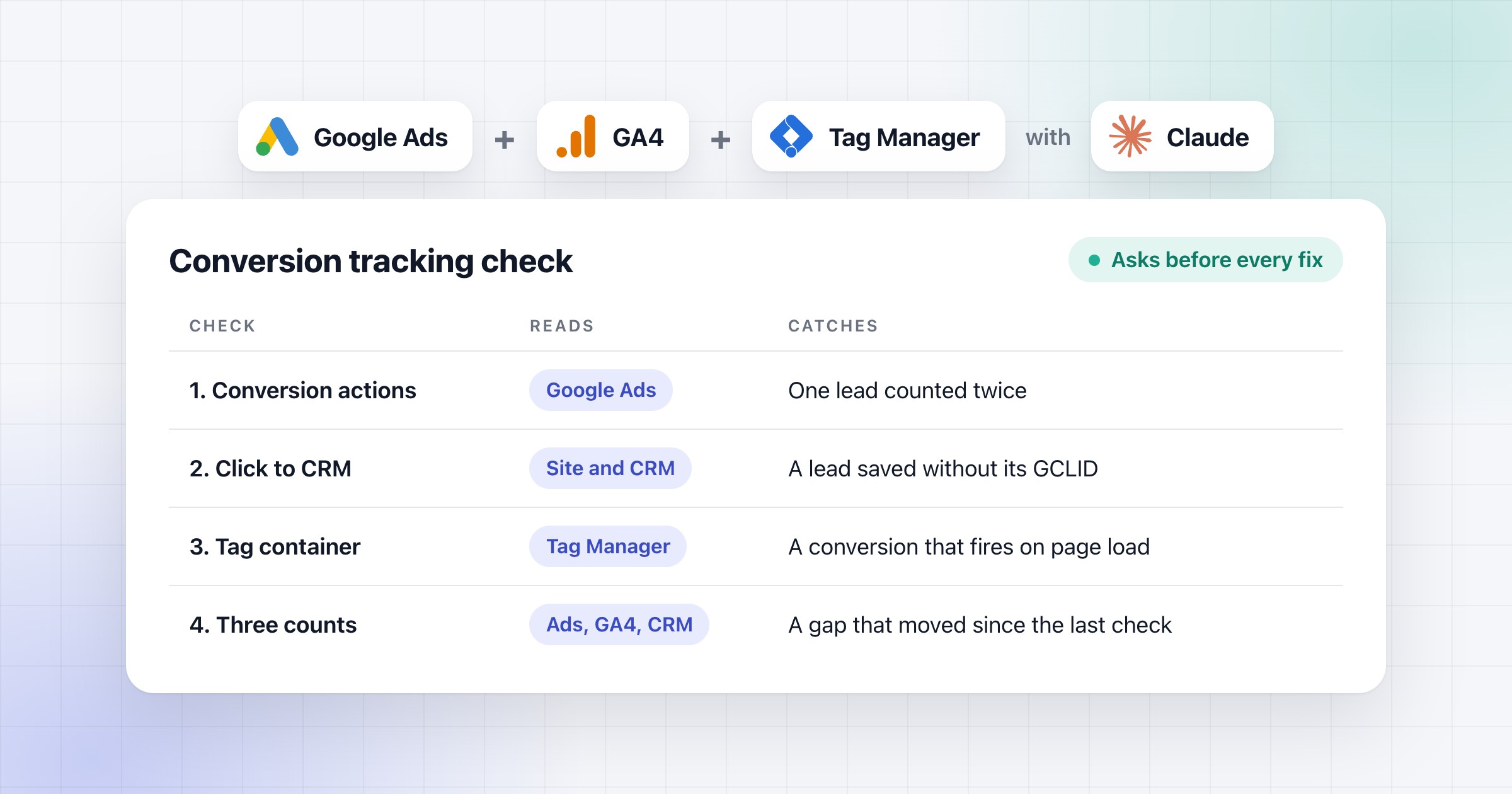
One more thing. The Conversions column only counts primary actions, the ones bidding learns from, while All conv. counts every action. So first make sure you know which actions count. If the actions themselves look wrong, check the tracking before anything else.
How to check a negative before you add it
I never add a negative before I've seen what it would block. One word can block a lot of good searches. A negative stops your ad on the searches it matches, and the report only lists searches that showed an ad. So when you block a buyer's search by mistake, it just disappears from the report, and nobody sees what it cost.
For every possible negative, I check four things:
- The searches that converted in the last 90 days. Every one it would block, and whether a buyer sent it.
- Your own keywords. Google warns that if a negative overlaps one of your keywords, your ad won't show.
- What buyers search for, beyond the report. Your services the way a buyer would search for them, in singular and plural. For example, "suites" on its own would block "bathroom suites fitted".
- The negatives you already have. I flag any that blocks a buyer, and I don't add anything twice.
If a negative would block a buyer, I make it narrower. That means a longer phrase, or exact match on the one search that wastes money. If that still blocks a buyer, I drop it.
There's one exception. Someone searching for urgent help with a problem the client fixes, like "burst pipe what to do", has that problem right now. So that search stays out of the negatives and goes on a watch list. A search for how to do the job yourself gets the same check as everything else.
Some searches aren't my call at all. Price searches, nearby towns, competitor names and services the client might offer go on a separate list, each with the reason, and the client decides.
Which match type and level to give each negative
Phrase match for a theme, exact match for one search that wastes money. Negative match types work differently from your keywords. Here's Google's own example, for the negative "running shoes":
| Search |
Broad negative |
Phrase negative |
Exact negative |
| blue tennis shoes |
Can show |
Can show |
Can show |
| running shoe |
Can show |
Can show |
Can show |
| blue running shoes |
Blocked |
Blocked |
Can show |
| shoes running |
Blocked |
Can show |
Can show |
| running shoes |
Blocked |
Blocked |
Blocked |
"running shoe" gets through all three, because negatives don't match close variants. So add the singular, plural and synonyms you want blocked yourself.
Then the level. If no campaign should get a search, like jobs or training, you have two options. It can go on a shared negative keyword list that every campaign uses. You find those under Tools, then Shared library, then Exclusion lists. Or it can go on the account-level list, under Admin, then Account settings, then Negative keywords. Google applies that one to the Search and Shopping ads in Performance Max too.
If a search belongs to another campaign, add the negative only to the campaign that shouldn't get it. And for your own brand in Performance Max, Google says to use brand exclusions instead of negatives.
How to add the negatives to the account
On the accounts we run, Claude adds the negatives once I say yes. It shows me the page, with one card per list, and asks if it should add them. Before it asks, Google tests them without changing anything. If I say yes, it adds them where the page says, on a shared list, the account-level list or one campaign. Then it checks they went in exactly as I approved them, and logs them, so we can undo any of it. We set up the same thing for our clients, on their own accounts.
I still say yes to every negative myself. Finding them is the easy part for AI. On one of my own accounts, its first audit turned up a lot of missing ones. Deciding which ones are safe is the hard part, because one wrong negative costs too much, and nobody sees it happen.
On the next Monday, the weekly report looks at whether the blocked searches came back in other words, because negatives don't match synonyms.
Without that setup, tick the searches in the search terms report and choose Add as negative keyword. On a Search campaign Google adds them as exact match, unless you put quotes around them for phrase.
The report shows you the wasted spend. The check makes sure you don't block buyers while you cut it. For the rest of the routine, like the morning brief and the audit before changes, see how PPC agencies use AI agents.